
前言
在使用海外AI服务时,很多服务都有地区限制,比如 Gemini 的 Antigravity 等。如果你的谷歌账号是美区账号,很多限制就能迎刃而解。
账号在最初注册时会根据注册环境默认分配地区,比如在新加坡注册就会默认是新加坡区。但如果你注册时不是美区也不用担心,后续是可以申请更改的。
本文将手把手教你完成地区查询和修改。
一、如何查询自己账号的所在地区
在已登录谷歌账号的浏览器中打开以下链接:
https://policies.google.com/terms
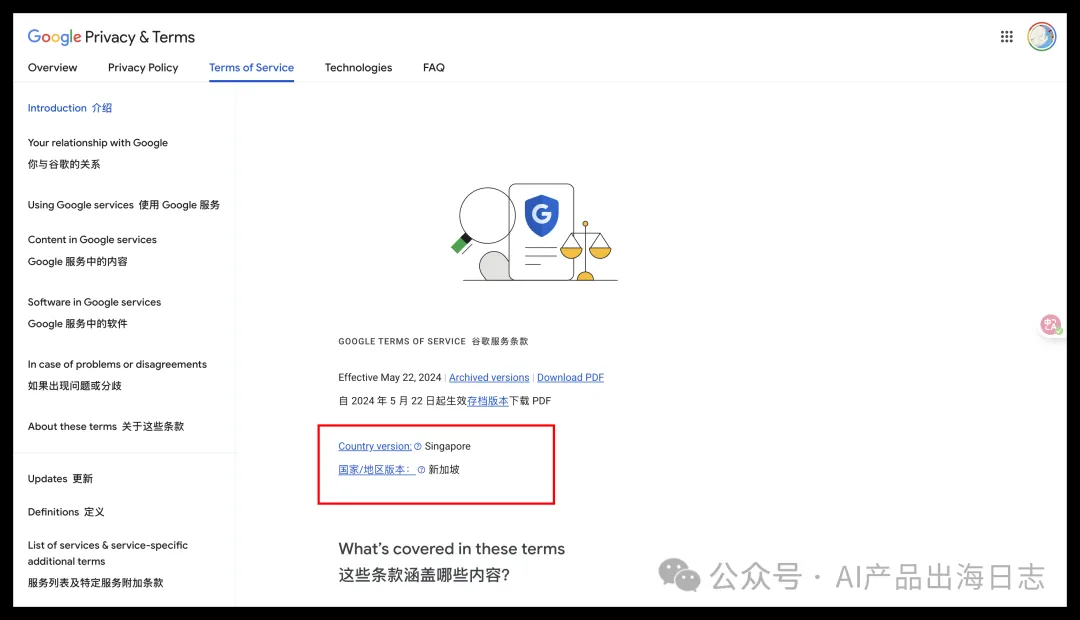
页面加载后,注意查看「Country version(国家/地区版本)」这一行:
- 显示
© United States→ 恭喜,你已经是美区账号,无需操作 - 显示其他地区(如
© Singapore)→ 请继续按下面的步骤申请修改
二、修改账号地区为美区的详细步骤
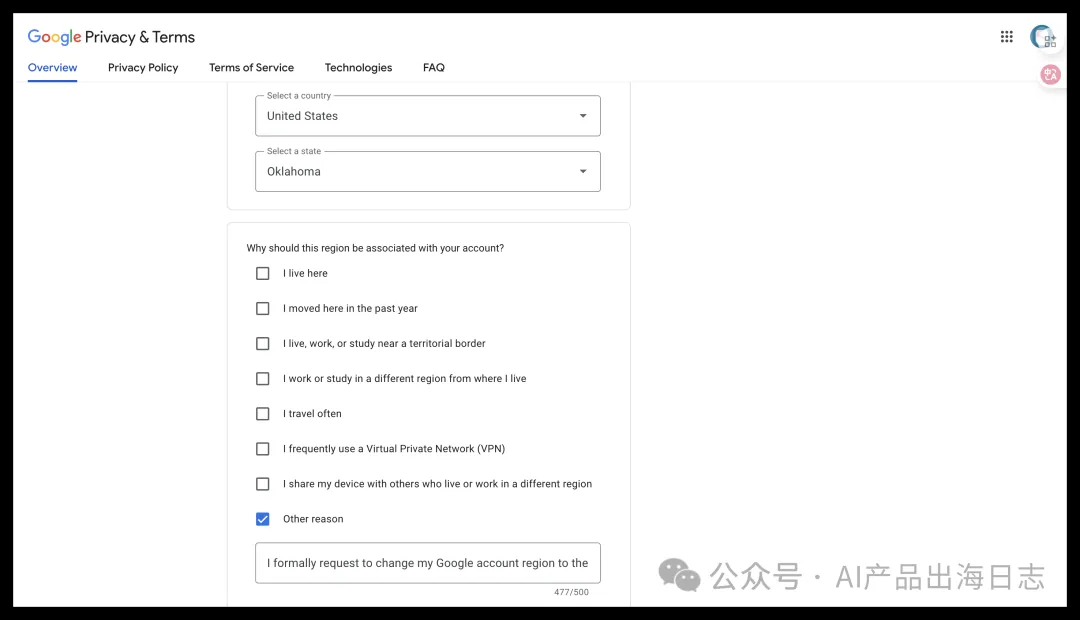
第 1 步:打开地区关联申请表
登录谷歌账号后,点击以下链接:
https://policies.google.com/country-association-form
第 2 步:填写国家和州
- Select a country:选择
United States - Select a state:随便选一个州即可(如 Oklahoma)
第 3 步:选择修改理由
表单会给出多个选项:
- I live here(我住在这里)
- I moved here in the past year(我近一年搬到这里)
- I live, work, or study near a territorial border
- I work or study in a different region from where I live
- I travel often(我经常旅行)
- I frequently use a Virtual Private Network (VPN)
- I share my device with others
- Other reason(其他理由) ✅ ← 选这个
第 4 步:编写英文申请理由
可以借助 AI(如 ChatGPT、Gemini)帮你生成,举例参考模板:
I request to change my Google account region to [国家/地区及州] for business reasons.
I am a [职位] in the [行业] industry, and need [目标地区] Google services
(如 Google Cloud, Google Play, YouTube) to work with our [目标地区] clients.
Please assist in updating my account region. Thank you.
示例(以服装行业项目经理为例):
I request to change my Google account region to the United States (Oklahoma) for business reasons. I am a Project Manager in the fashion and apparel industry, and I need access to US-region Google services (such as Google Cloud, Google Play, and YouTube) to collaborate with our clients based in the United States. Please assist in updating my account region. Thank you.
💡 提示:可根据自己的实际职业和行业自行替换模板中的内容。
第 5 步:提交申请
填好后提交即可,一般第二天就会收到谷歌邮件,通知你地区修改成功。
总结
表格
| 步骤 | 操作 |
|---|---|
| 1 | 打开 policies.google.com/terms 查询当前地区 |
| 2 | 打开 country-association-form 申请表 |
| 3 | 选择国家和州(州可任选) |
| 4 | 理由选 Other reason,用英文模板填写说明 |
| 5 | 提交后等待邮件,通常次日生效 |
整个过程完全免费、无需梯子魔法设置,赶紧检查一下你的账号地区吧!
发表评论